
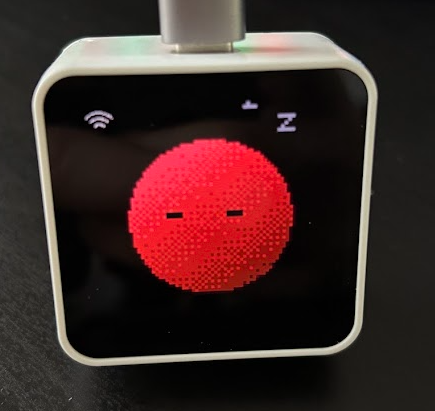
On September 25, I had zero notion of hardware. At least not at the level I’m at today. On October 6, a little pixelated red ball answered my questions, created content for me and improved apps I had built, by looking up the answers in my vault.
His name is SPOT.
It started with Meta... and a big urge to do “better”
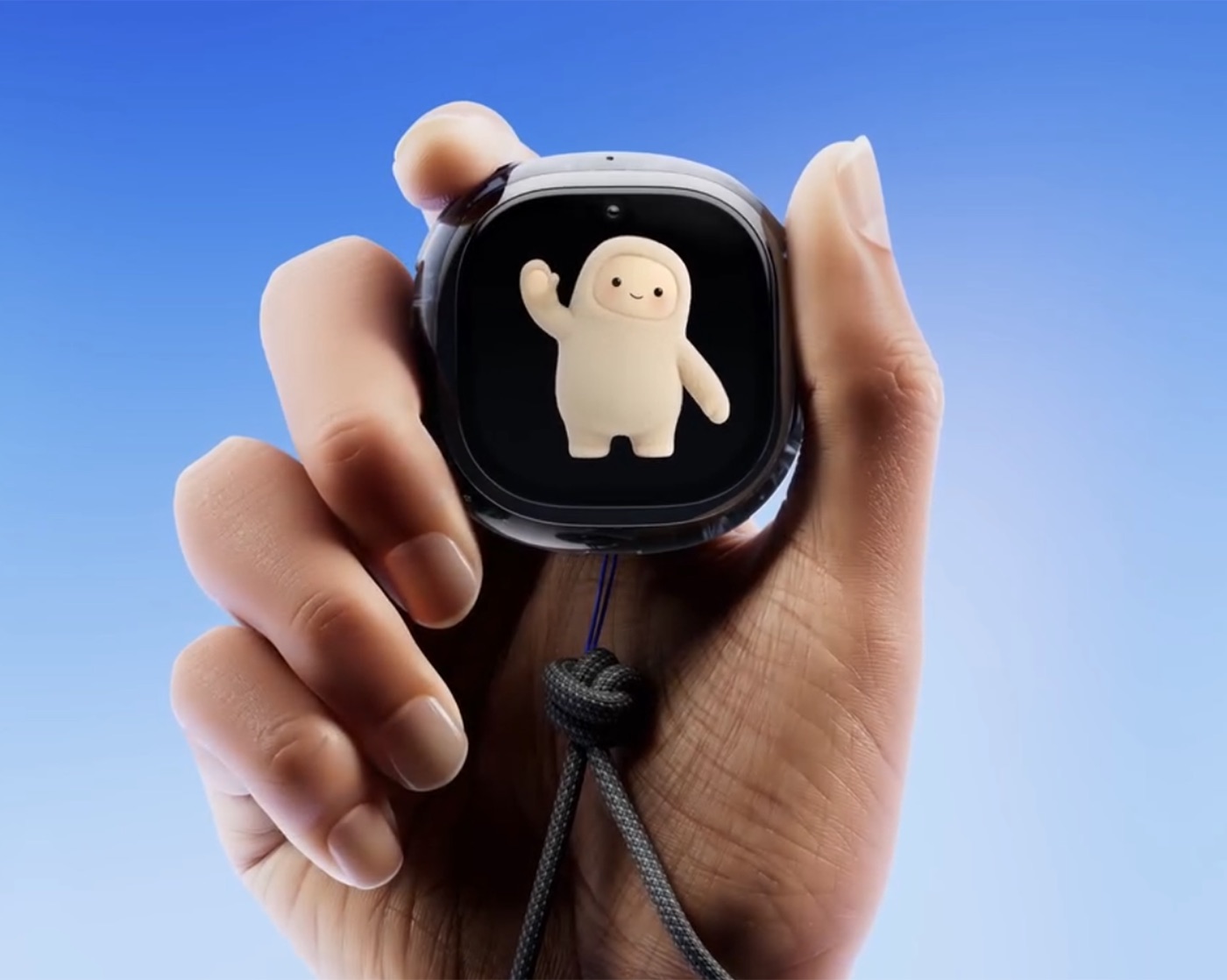
On September 23, at the end of its Connect 2026, Meta introduced the Muse Charm. A small pocket device, a screen of about 2 inches, an animated avatar living on it, and its AI agent, Muse, which you talk to without taking out your phone. A Tamagotchi for the AI era, you get the idea.
My first reaction: “damn, this is so good!” Except I have zero desire to pay for one more device, locked into a big company’s ecosystem, that knows nothing about me. Besides, I haven’t been on Facebook or Instagram for a little while now...
What I wanted was a pocket companion plugged into my vault. My memory, my projects, my tools, my apps.
Mine, not a generic assistant. And I didn’t want to pay hundreds of dollars for it either.
I started from my own needs: what do I miss in my day-to-day?
Not one more screen, I already have 4. I already have a vault, agents and tools plugged into it.
What I really miss is being able to talk to them quickly, in a fun way, with a wow effect for anyone watching... all without opening a computer: dictating an idea while walking, pulling up a number in the middle of a meeting, launching a job while I walk... with no phone and with “nothing”.
The vault is the memory. It was missing a “soul”.
My vault is what helped me build it
SPOT isn’t just plugged into my vault: the vault is what I used to build it. Without it, I would never have met the deadline on a subject like this one, where I was starting from zero.
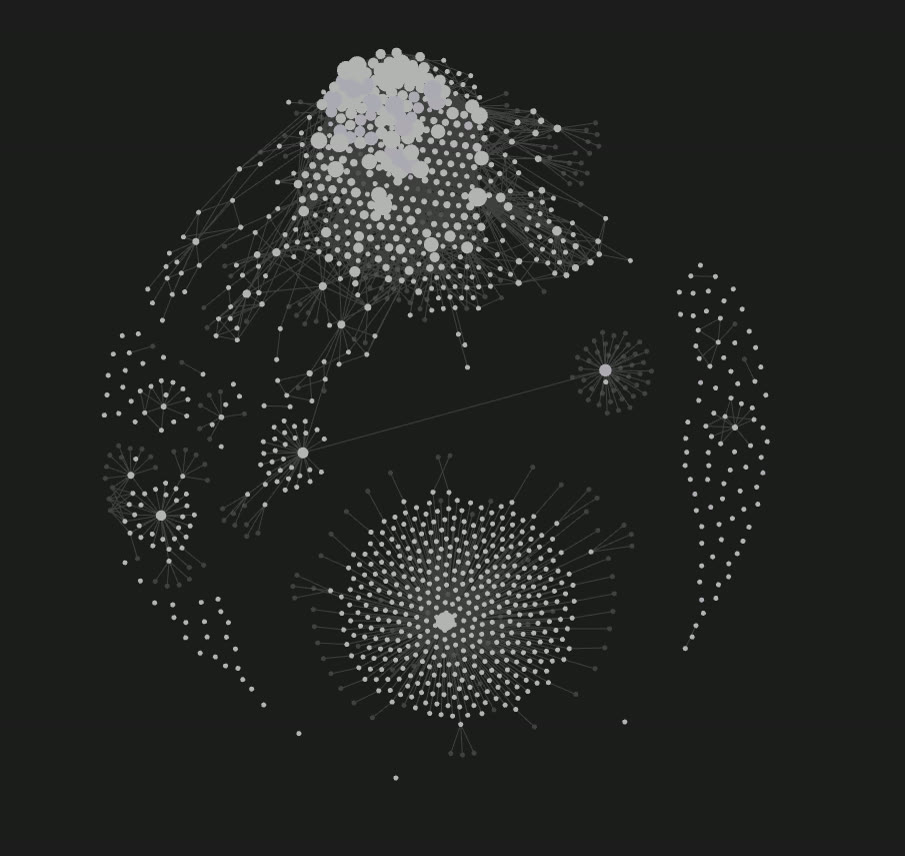
A project note that acts as memory. At the start, everything I learned went into a single note: the hypothesis about the original hardware, the comparison of boards, real prices, verified links, decisions and the reasons behind them.
When I found out that some €35 development boards were hiding €5 to €8 in shipping, the fix went into the note, with the lesson: read “Service commitment” before comparing anything. Every new session reread that history instead of asking me for the whole context again.
A replication guide written as I went. How it works, bugs fixed, mistakes to avoid, the procedure to redo everything from scratch. Fed while we were moving forward, not afterwards (afterwards, you’ve already forgotten half of it...).
My rules and my tools, applied to SPOT. My lasting instructions (save tokens, never put a secret in Git, nothing is done until it’s verified) are reread by every session. The bridge linking the dev board to my PC carries the same rules in its prompt, a diagnostic script, npm run doctor, checks in a few seconds that everything is in place, and my existing tools (infographic generator, Telegram sending, scripts from my other projects) can be driven from the screen.
Handover notes between sessions. When a session got too long, I wrote down where I was, what had been decided, what was left. The next one picked up exactly there.
And the loop closes. Once the board was in service, SPOT itself feeds the vault. I dictated the details of my October 22 live to the board, and they landed word for word in the inbox, ready to be filed. The vault built the object, and now the object feeds the vault.
A shared knowledge system, custom tools, a consistent marketing strategy. I build it with your teams.
So what about the costs?
The board: Waveshare ESP32-S3-Touch-AMOLED-2.16, €34.79 with battery (official Waveshare page, AliExpress link). It’s the heart of the object: a module already in its case, 46 mm per side and 22.5 mm thick. Inside, you’ll find:
- an ESP32-S3 chip (16 MB of flash memory, 8 MB of PSRAM, 2.4 GHz Wi-Fi and Bluetooth LE, no 5 GHz) that runs the program;
- a square, touch AMOLED screen of 2.16 inches, 480 by 480 pixels;
- two microphones and a built-in speaker: all the audio is already in the board, nothing to solder;
- a motion sensor, which was useless to me... until V2, I’ll come back to that;
- a 1,000 mAh LiPo battery, a USB-C port, a microSD reader;
- three buttons on the edge, the middle one is for talking.
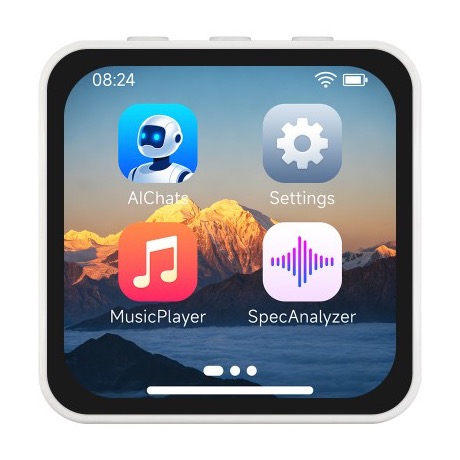
I had also ordered a separate speaker, convinced the board didn’t have one. Wrong, it’s built in!
I picked an all-in-one touch board rather than a Raspberry Pi, because the Pi was way overpriced, with the shortage going on right now.
Okay, so how does it actually work?
First off, the board doesn’t think. It doesn’t have the power for it. It’s an interface, nothing more, nothing less.
All the intelligence runs on my PC, in a program I called “the bridge”:
- I press the middle button and I talk.
- The bridge transcribes my voice with Whisper, locally on my graphics card: it’s free and private.
- It sends the text to Claude Code, plugged into my vault and all my projects (with my Claude Pro subscription, not an API key)
- The answer comes back in voice and images: tables, swipeable tiles, maps, photos, infographics, scrolling text... everything I want, the way I want it.
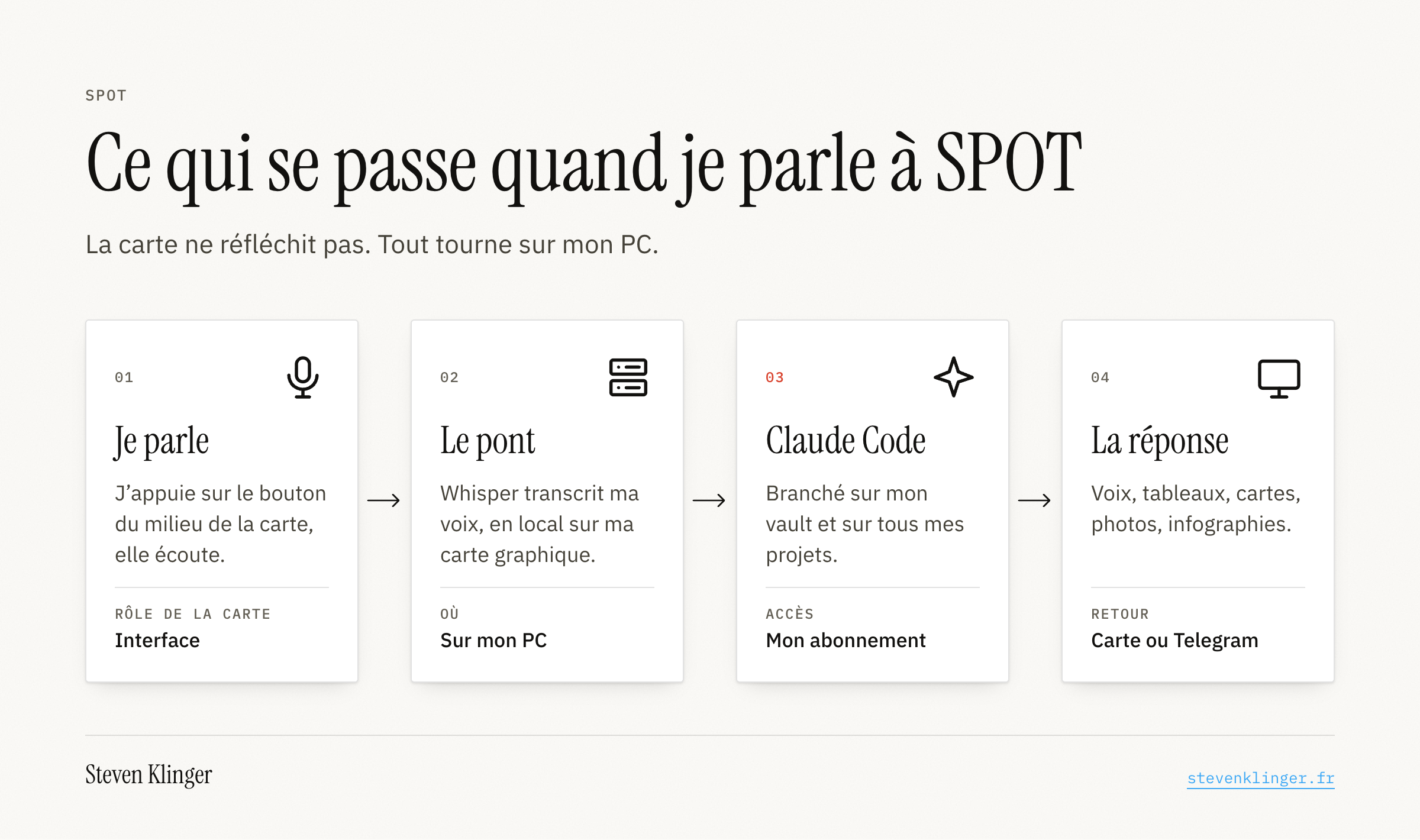
On the technical side: C++ on the board, Node.js on the PC, and Python for the voice. The two talk to each other over a WebSocket, which carries the voice, the images and the commands.
You see the point: the “brain” can change, the board stays the same. And if tomorrow I want a desktop version or a wall-mounted frame, it’s the same bridge behind it...
By the way, Apple just announced its HomeView... I think I’m going to have to build “mine” all over again!
And the avatar, then?
A little character that breathes, blinks, stretches, yawns when you ignore it... that one you keep on you. It’s fun to use. And I NEED help to make me want to use my own system when I feel friction working.
I tried several looks. The one that stayed is this little red ball.
It has its moods: rest, listening (waves that follow my voice), thinking, speaking, joy, error (gray, crossed eyes), sleep. To look alive without anyone asking it to.
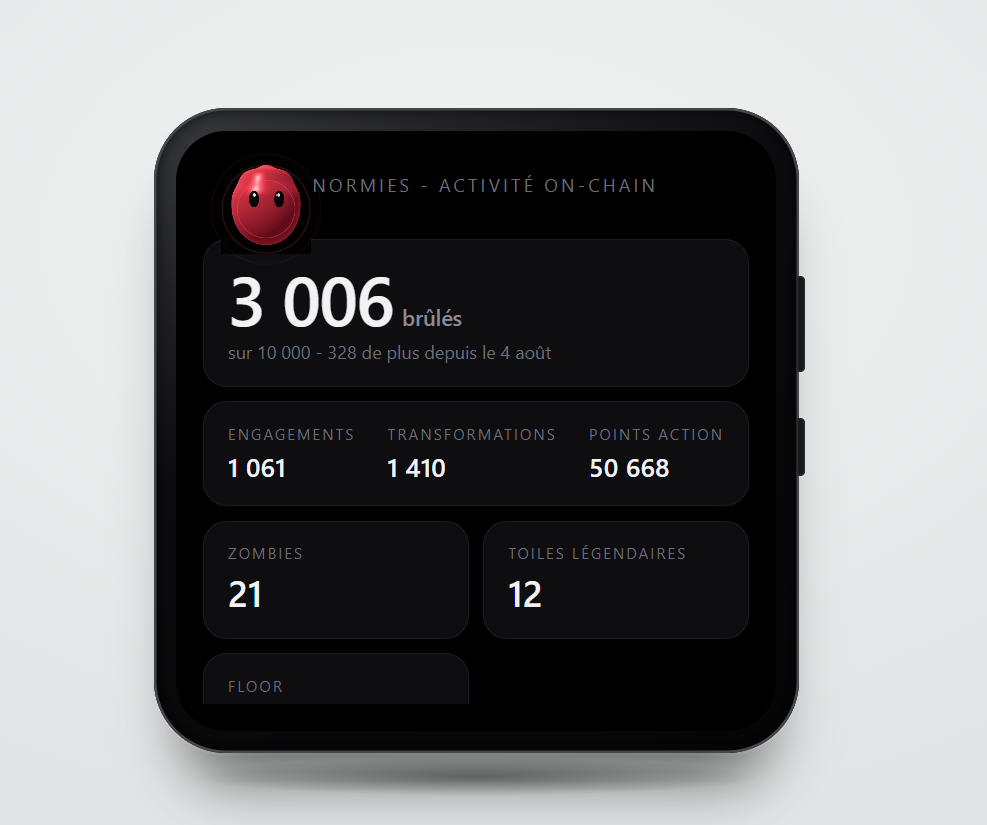
I also created an “NFT Web3” mode to display the data and prices of certain NFT projects in their own art direction.
Method and design matter more than technique these days
First the software, before I even had the board. Order placed on October 5, delivery announced between the 12th and the 20th. Rather than wait, I built the bridge and a web simulator of the screen. When the package arrived, half of the work was done. All I had left to do was “just” use the tool.
Then the firmware, in tiny steps. Display the avatar. Make it breathe. Connect the Wi-Fi. Plug in the microphone... step by step. With a learning loop in the vault so I wouldn’t forget.
And bugs. Lots of them. Some of them completely stupid, by the way:
- The screen silently ignores any badly positioned write. My “no network” icon never showed its red cross, and it took me a while to understand it wasn’t my code... but the screen’s chip that was blocking it.
- The Wi-Fi scanning for networks froze the avatar’s animation. Solution: the whole network part now runs on the processor’s other core.
- A data panel crashed the board, because of a 5 KB copy onto a stack that was too small.
- Whisper hearing silence and making up sentences, “Thanks for watching this video” when nobody had said anything. I had to add a noise gate that sends nothing to the model until there’s real speech.
All of this is in the replication guide I created and added to my vault. So I don’t start from zero to build a similar system! Think reuse and knowledge capitalization, it’s fundamental.
Where SPOT stands today
One week after the first launch, here’s what SPOT can do:
- capture a dictated idea, straight into my vault, word for word, without me touching a keyboard;
- set timers and reminders, give the time, the volume, the tokens used, without even calling the model (so it’s free and instant);
- display live data: the floor of NFT projects, the value of my stock portfolios, the latest sales...
- show a map, a photo, an infographic generated on demand with my own tools;
- launch actions, with guardrails I detail further down;
- record and transcribe a long monologue, a meeting or a live, which goes into the vault;
- go silent (subtitles on screen, no beeps) and switch Wi-Fi by voice;
- work away from home, through an encrypted tunnel protected by an authentication token.
By the way, SPOT is the one who invited people to my next live. I dictated the details to it and it formatted them to create the event.
I spent a day outside with SPOT.
On October 12, I wore it all day, which let me improve it and build a much more efficient V2. Here are the problems I ran into:
The dumbest one first: by evening, it was dead. 1,000 mAh, drained in one day. For something you wear, that’s a dealbreaker. Digging in, four culprits. The board’s program was spinning idle all the time. The speaker amp stayed on even in silent mode. The Wi-Fi never went into power saving. And the screen animated SPOT at full speed... even while it was asleep!
All fixed. And I really didn’t want it to switch off: now it truly sleeps, very dim, processor slowed down, but you can still see it. I can even ask it for “battery life” to know how much time it has left, calculated from its real battery discharge curve (data saved in the vault too).
Second problem: the screen looked like a prototype. A pixel font with no accents, frames drawn... clumsily, cut-off text. I redid everything:
- a real font, smooth, with accents;
- two improved layouts. When SPOT has a sentence to say, it stays big and the sentence shows below, like a subtitle. When it has data to show, it shrinks into a corner and presents;
- and above all, it lives with what it displays: it looks at the table it just pulled up, it reads along with you as the text scrolls, it does a little jump when a panel arrives, it smiles when it’s good news.
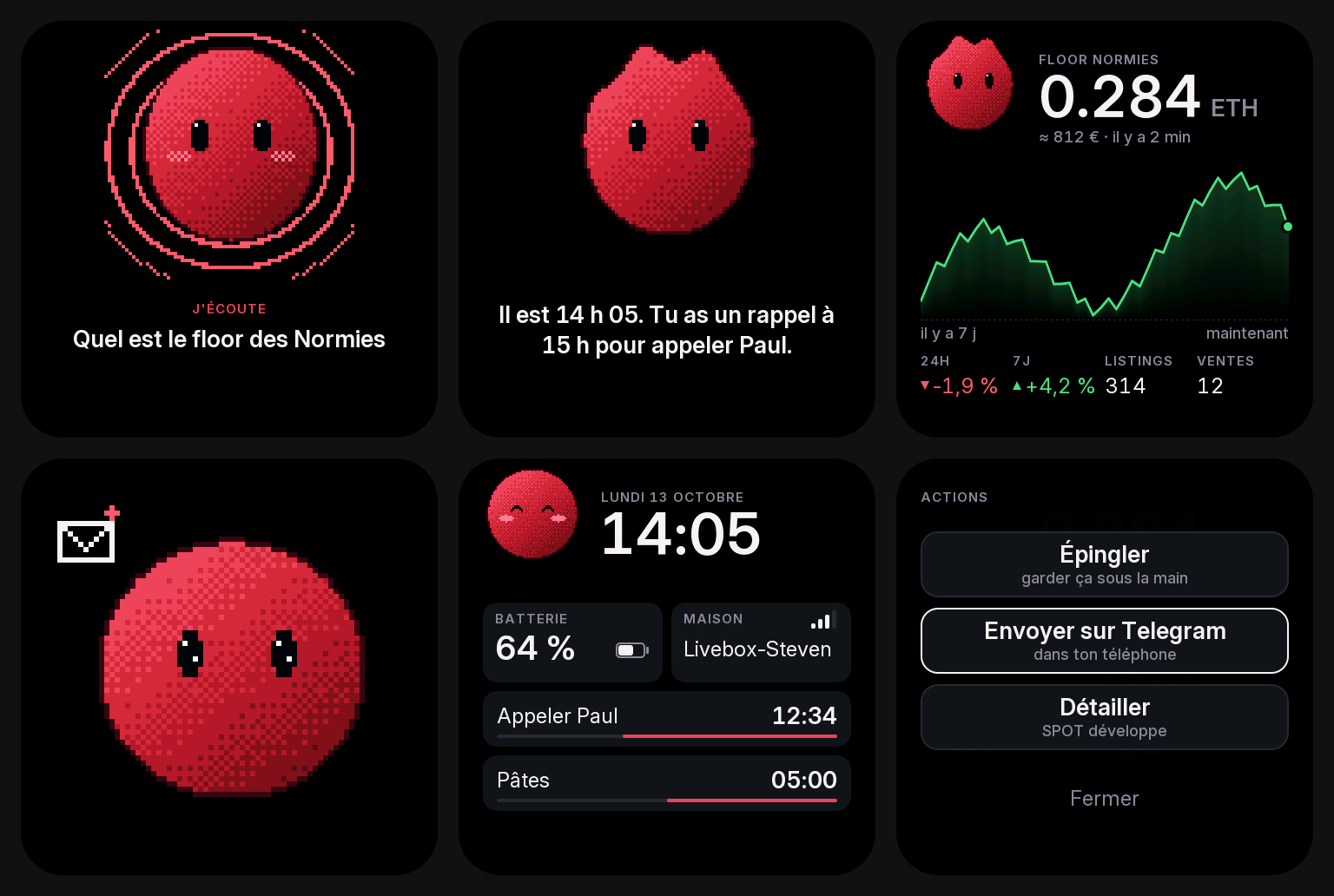
Third point: gestures. Something you wear, you don’t handle like a phone. So:
- I raise it, it wakes up, the famous motion sensor that was useless;
- my words show up while I speak, so I see right away if the transcription is going sideways;
- a long press on what it displays opens a menu: pin it, send it to me on Telegram, or ask it for more detail. Without saying a word, handy in meetings by the way.
And the most important thing for me: SPOT has to stay the one I talk to. I could have built a Telegram bot, no point. So Telegram becomes an extension of SPOT. If the answer is too long for the device, it tells me “I’m sending you the details on Telegram” and I find the full table on my phone. When I don’t have it on me, I send it a voice note. And when it’s working, I can see where it’s at.
What really changes the way I work with SPOT is that I can hand it a job directly. “Launch an agent on this project, fix that.” It starts a separate Claude Code session, in an isolated copy of the project, with these rules so it doesn’t break anything. I follow the progress by voice or on Telegram and it tells me when it’s done, I look at the result... and if I’m happy with it, I approve straight on the device. It merges the changes into the vault and saves everything. Code launched from the street, checked before it reaches my project. Isn’t that beautiful? (Come on, admit it’s pretty cool!)
A small confession about method: I didn’t code this V2 with a single agent. I handed each piece to a different agent inside Claude, in parallel: one for the board, one for Telegram, one for the jobs, one for the simulator. Meanwhile, the main session designed the screen and checked every screenshot generated by the real code. Exactly what SPOT can do now, in turn.
For the live, I also added a mirror screen: the board is 46 millimeters wide, nobody would see it on camera. The PC displays, big and live, exactly what SPOT displays so I can show it live on the PC.
So what does it do in my day?
It’s been in service since October 6, so I don’t have six months of hindsight. I’m telling you what I’m building for it, without pretending it has already crushed it on efficiency.
So I’ll take this article as an example... I was outside, walking from point A to point B, and I felt like getting started: pooling everything the vault knows about building SPOT, and adding my voice, my way of telling the story. I launched SPOT’s transcription mode to start roughing it out, while walking. Then I had to reread it and see what it would look like on my site. So I asked SPOT to send me a PDF of the rendered article on Telegram, to see the layout of the elements and how it read, then give feedback. Continuous improvement, while I was getting some fresh air.
The result: I saved time on content that’s valuable to me, business-wise, and to the people who’ll read it and learn something from it. Content I often put off, for lack of time. And that’s exactly what happens in companies: they know content creation is useful, that it matters for business, and they put it off, because it’s time-consuming and you have to make time for it.
I set up the tools that get content out the door, with your teams.
The rest of the time, I use it at three moments of my day.
Morning and evening, to take stock. I ask it for a brief: what’s pending, the captures to sort, the projects in progress. It shows them as swipeable tiles rather than a 40-line list I wouldn’t read anyway.
Between two topics, I record. My best ideas come when I’m not in front of my screen. And I used to lose them. Now they land in the vault’s inbox, by voice, ready to be sorted by my agents right afterwards.
In meetings or live, I have answers at hand. A number, a name, a decision made three months ago: the vault has it, SPOT pulls it up without me opening anything. As soon as I’m outside, it’s become my main interface.

AI, yes. But left to run on its own, never.
106 commits. That’s what SPOT’s repository contains, from September 26 to October 13, over only six working days. Including 55 on October 6 alone, the day the board arrived.
“Wow, AI is fast.” Yeah, but a commit has never proven the quality of anything, especially since with AI you can make them by the dozen.
Going fast, anyone can do that by letting an agent run. What took me time, and what makes what I built not just another AI gadget, is the design, the thinking and the reuse of everything around this project.
What annoys me most, in the way people talk about AI right now, is that it’s still sold to you as a miracle solution: it will optimize your whole business, triple your sales, prospect for you. Except no. AI is a tool, one you have to learn to use, adapt and shape to build your own solutions. If you want to paint, you don’t dip a hammer in paint and hit the canvas, you pick up a brush. There’s a lot of bullshit around this, because of the miracle sellers, as usual, and of those looking for a shortcut to delegate their thinking to AI. I explain how I see AI on the Useful AI page.
I check what it really did. The “no network” icon never showed its red cross, even though the code was right. Whisper thanked people for watching a video... in the silence. In both cases, it’s by looking at the screen and listening to what came out that I spotted the problem. A model that makes things up with confidence, would you let it speak alone in your company?
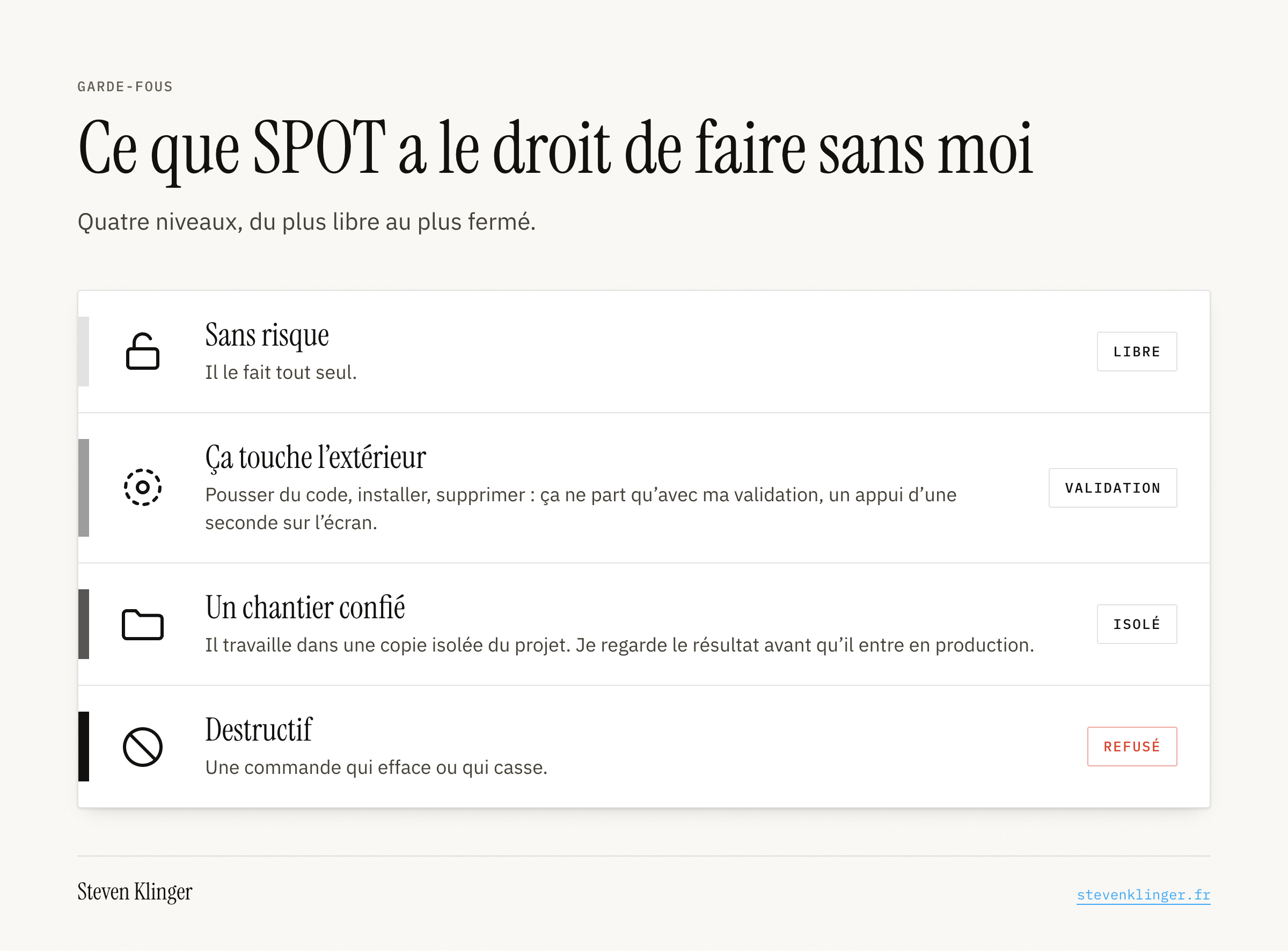
I decide what it’s allowed to do without me. An AI demo shows you what it can do. Almost none shows you what it isn’t allowed to do, and that’s the only thing a management team wants to know. At my place: what’s harmless goes through on its own. What touches the outside world (pushing code, installing, deleting) only goes through with my approval, a one-second press on the screen. Anything destructive is refused outright. And when I hand it a job, it works in an isolated copy of the project, and I look at the result before it goes into production.
I know what I don’t want. I don’t give sensitive or private data to my systems, because today all of that is still handled by American companies like Anthropic or OpenAI. Other solutions exist, and the advantage of my system is that I can plug in any of them to try them out. Knowing how to say no to your own tool is part of steering it too.
It doesn’t forget what we decided, and everyone has access. In most companies, AI is used in silos today: everyone with their own Claude Code subscription or their own ChatGPT, documents slipped in without much control over how they’re handled, and almost no shared knowledge base. What’s missing most is pooling everything that gets done in the company. That’s what I build in the companies where I’m CMO, because being a CMO means taking care of the outside but also the inside. At my place, memory is written in one spot: project note, guide, handover notes, rules reread by every session. In a company, it’s a person leaving or a month of vacation that wipes out the context. At my place, it’s the end of a session. Same problem, same answer: write it down as you go, where the AI rereads it every time.
And what I build, I show at the same time. Meta’s Muse Charm gave me the push to create. The simulator existed before the board, so there was already something to look at from day one. The video where SPOT invites people to the live, the mirror screen so the camera has something to show: nobody asked me to “make content”, the tool produces it as it gets built. Same logic as on NFT Nexus, where every feature shipped came out with its demo GIF. Marketing that makes sense, to me, is showing the real work while it’s happening.
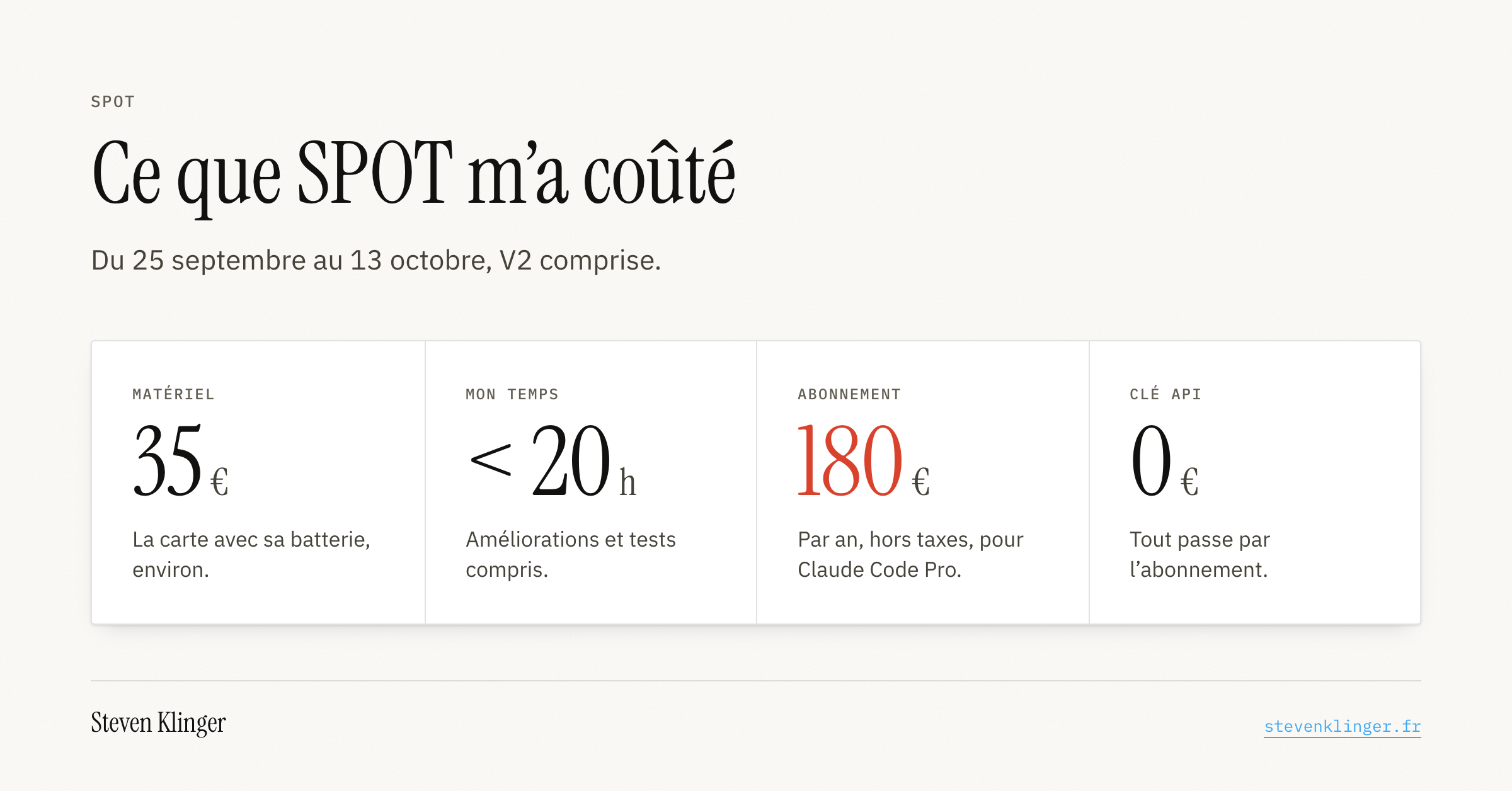
Cost-wise, the hardware comes to about €35. My time, a little under 20 hours in total, V2, improvements and tests included. And nothing else: everything runs on my Claude Code Pro subscription, €180 per year excluding VAT, no API key. What I was missing before SPOT was a simple interface, within reach, one button, connected to my whole environment. Today, one dictated sentence can send me a document on Telegram, drop into the vault, or start a development session without me opening Claude Code or having my computer at hand. I’ve handed it article development, sales documents sent straight to my phone, infographics with my generator. I don’t count my dictations, I’d be lying if I gave you a number. It makes all my processes smoother, that’s what to take away.
Making marketing, product, tech and AI work together in a company with dozens of employees, even hundreds, comes down to three questions: who’s allowed to do what, where knowledge lives, and what’s it going to bring us. For the second one, SPOT is the miniature demonstration: the same brain, the vault, with several interfaces. A keyboard to work, a voice to capture, a small screen to look things up, a phone to follow along. At your place, it would be the same thing on a bigger scale: knowledge in one place, and everyone querying it through the channel that suits them.
I’m not a tinkerer, nor a developer: I’m a CMO who uses artificial intelligence, and who uses it very well, to be honest, but only when it serves the company I work for. If it makes me more efficient, the company wins. If it smooths out a process, the company wins. I don’t put AI in just to put AI in. Using AI tools isn’t enough anymore: you have to design solutions adapted to each company. In a bigger company, here’s what that would look like:
- rolling out AI solutions in every department of the company;
- building a knowledge space for each team, and bringing certain functions together to speed up content creation;
- getting knowledge to flow from the tech teams to the sales teams, and the other way round;
- growing ambassadors inside the company;
- improving product design and prospecting.
Want to see it for real?
On October 22 at 11:30 a.m., I’m doing a LinkedIn live. I’ll show you SPOT, the vault, and how to build a knowledge space with an AI (Claude Code, Codex), based on everything I’ve created over the last six months: for marketing, for development, for companies, and for myself day to day. The goal: for you to be able to do it yourself at home.
Catch me on LinkedIn, or by email if you’d like to talk beforehand.
I’m a CMO and I only use AI when it serves the company. Assignment or position: write to me.