
This article will walk you through what this studio does, how I designed it, how I maintain it, and above all why I built it so it can be plugged into other people’s businesses. Because what matters to you isn’t what I do for myself, it’s what this could do for you!
Why did I build it myself, with AI?
Because the marketing strategy and the tool that serves it are best designed by the same person, plain and simple. That’s what happens when a tech marketer designs the thing, haha.
When I tell someone “I build the tool that serves the strategy”, I can show them the tool running behind it.
Every function in the studio exists because one day I needed it to do my job better, to lighten my load, to focus on channeling everything going on in my brain (and things move fast in there!). Nothing is here just to look pretty...as you often see on LinkedIn when it comes to “AI solutions”.
It all starts with the vault, again and always!
The studio would be worth nothing without the brain that drives and controls it. It relies on my vault, a system of interlinked notes (more than 1,400 today) where “everything I know” is stored: my projects, my clients, my rules, my way of writing, my decisions and the reasons behind each one.
A system that is constantly evolving, to be ever more effective and ever more relevant.
Before writing a single line, the AI (Claude Code here, but you could plug in something else) reads what I know. Before suggesting a post, it reads how I really write: I’ve measured my voice, the length of my sentences, my tics and the phrasings I never want to use (bye bye slop bullshit).
When I correct a text, the correction goes back into the vault, and the system does better next time. Even a tiny bit better is still better than before: baby steps!
My knowledge also builds up in this system: every transcript, every decision, every corrected mistake is stored there. The studio has no memory of its own, it uses mine, which is stored and maintained in my vault.
So what do I use this studio for?
Today. The home page reminds me of what I must not forget: what am I publishing today, what’s missing for the coming days? What should I prioritize? It also gives me the day’s prospecting goal, or the client goals I need to hit within the day, week or month.
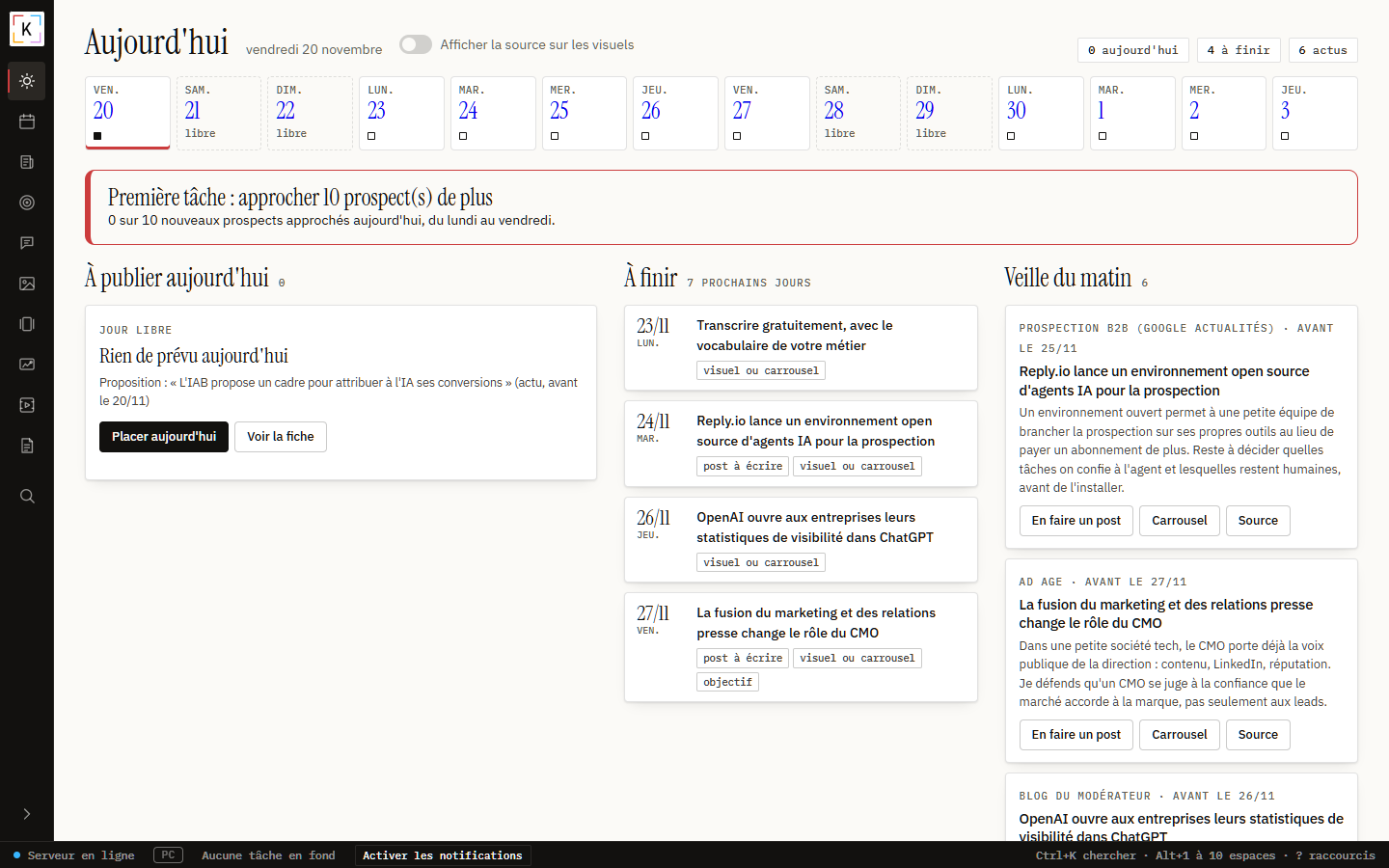
The publishing calendar. Each post is a tile with its draft, its visual and a business goal, which can be mine or my clients'. I can see at a glance if I’m running short of a certain “type of content”. In the screenshot, the calendar alerts me on its own: I’m missing posts aimed at lead acquisition, for example.
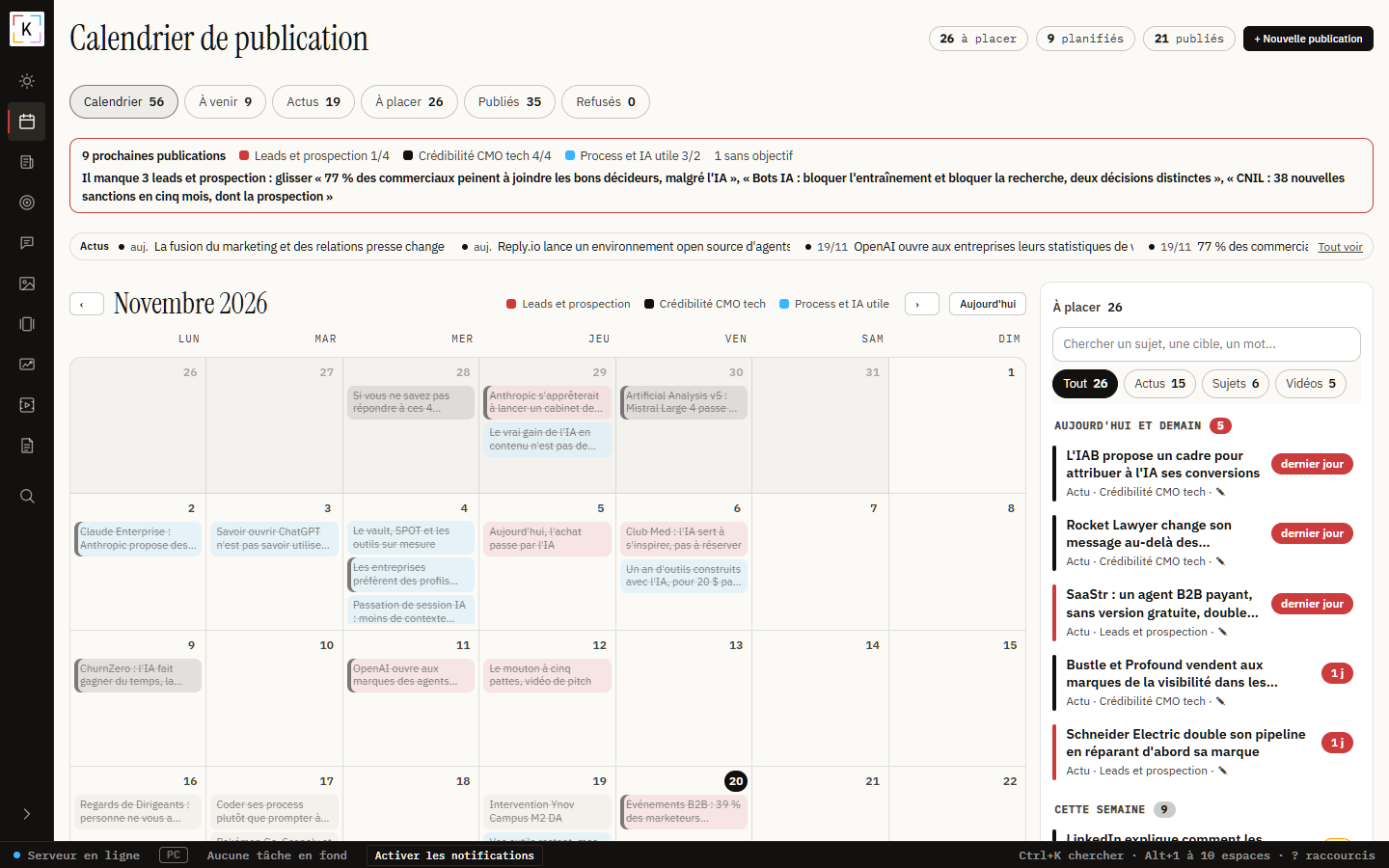
News monitoring. Every time I turn on my PC, a script runs, so zero tokens used (write scripts, for crying out loud!), and reads more than 50 feeds and sources that I picked on AI, B2B marketing, prospecting, LinkedIn but also general news. A model only does the final sort: 0 to 3 news items a day, verified, stored in the vault, and suggested for publication before their deadline. I choose, I write, I publish. Nothing goes out without my writing and my review.
Once again, I don’t want to bombard my networks and my clients with slop. I don’t want to waste your brain time.
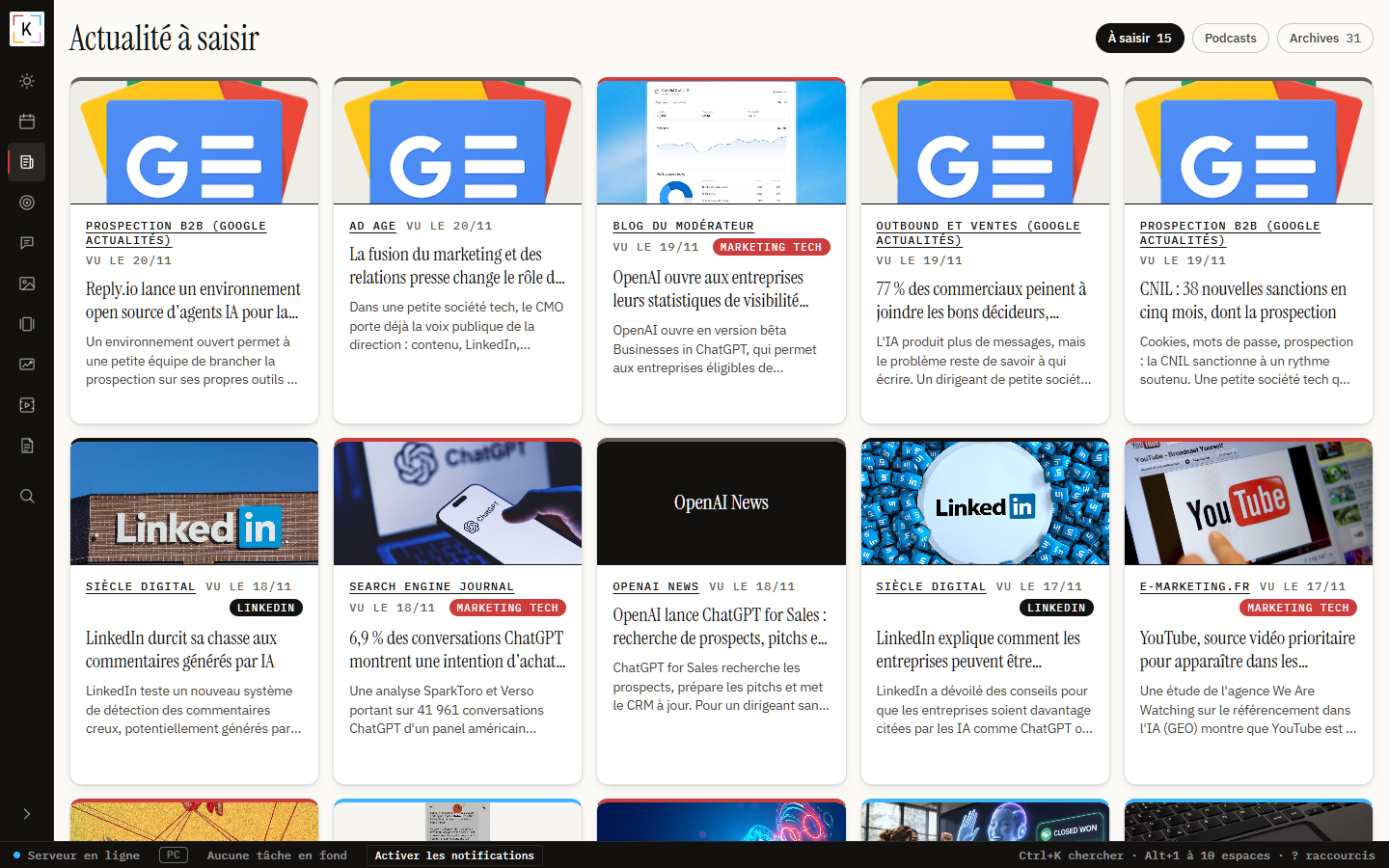
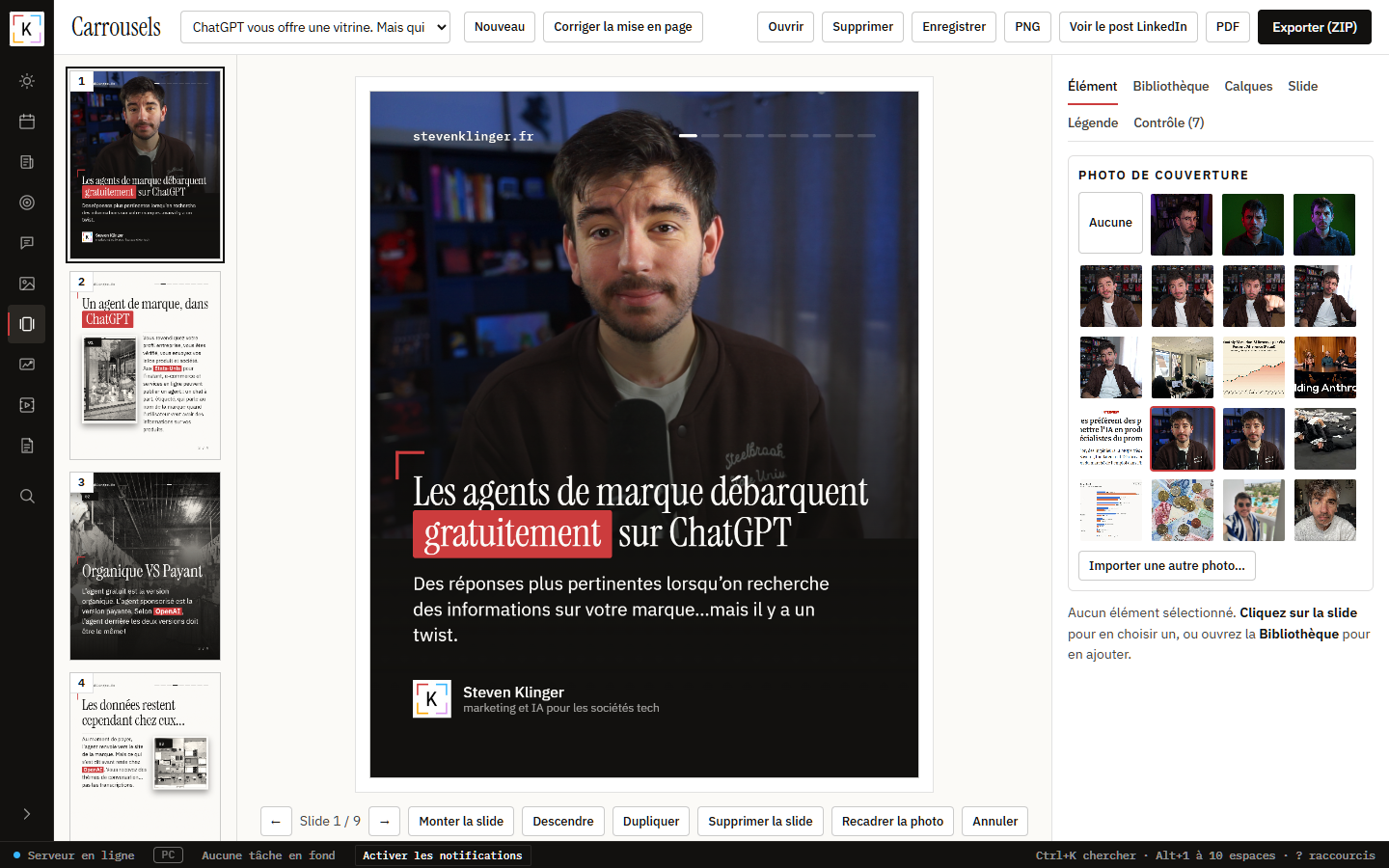
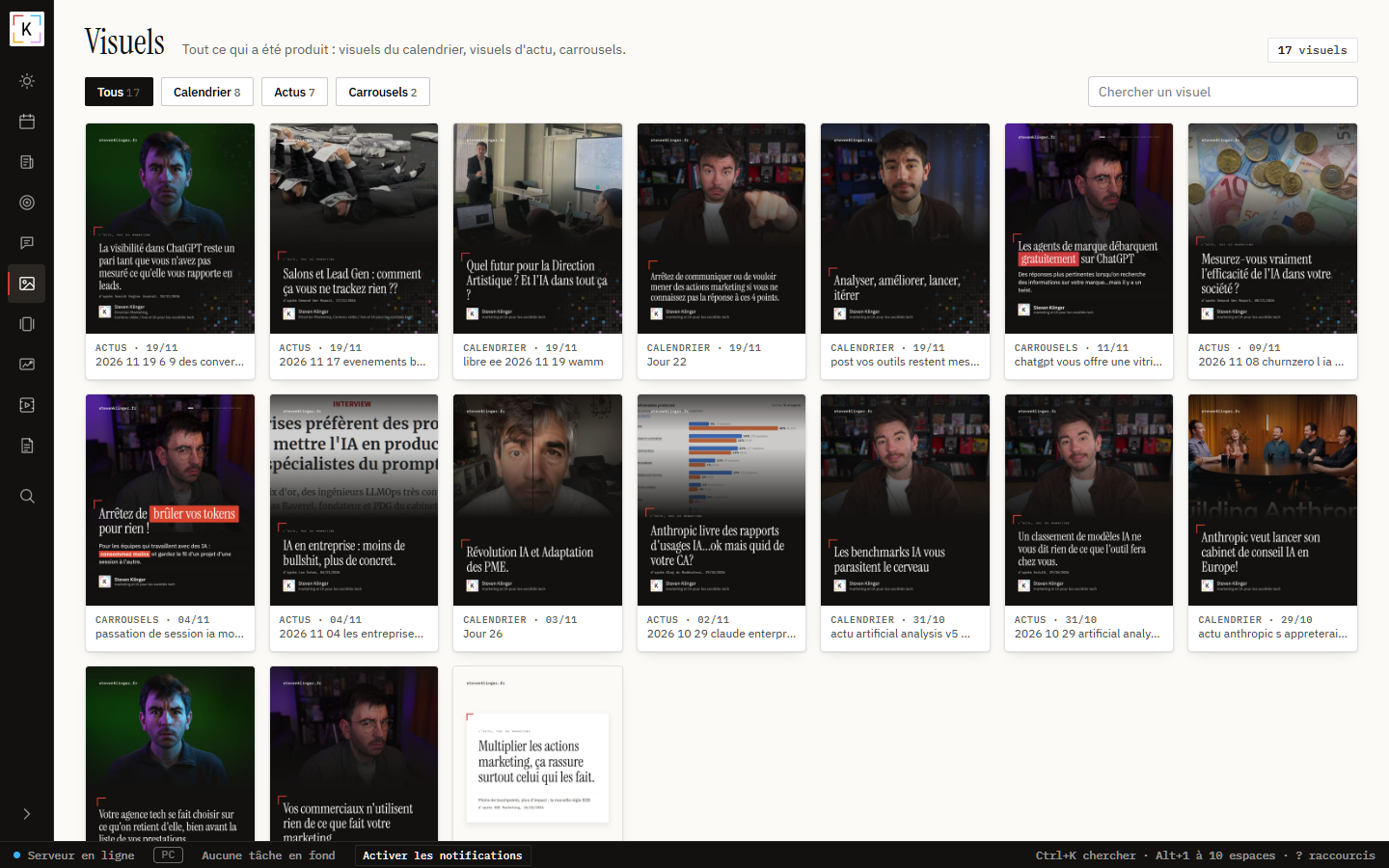
Carousels and visuals. A carousel builder in my own art direction, with 11 different templates, a cover photo picked from my photo library, and PNG and PDF export. And a gallery that stores everything I’ve produced, tile by tile, for the record.
I set up the system that gets content out the door, with your teams and your tools, and we use all of it to run marketing campaigns that make sense for your current challenges.
I didn’t build it to edit videos in my place: I MAKE videos
I’m a video maker before being a tool developer (and I haven’t been a developer for a few years now, by the way). I do streams, lives and face-cam videos on YouTube, and everything you see in the studio is first and foremost there to improve the pace and quality of my productions and my clients'.
My latest video: an investigation into the trends that exploit children on the Internet. Script, face-cam shooting, editing, subtitles, thumbnail. I can do all of that by hand, which is why I later developed tools to support me in that work, rather than replace me.
My setup runs at home: green screen, light panels, camera, microphone, mixing console, several screens. I built it and I run it myself, including during a live broadcast (I did 3 years of streaming on Twitch and many professional lives for my clients).
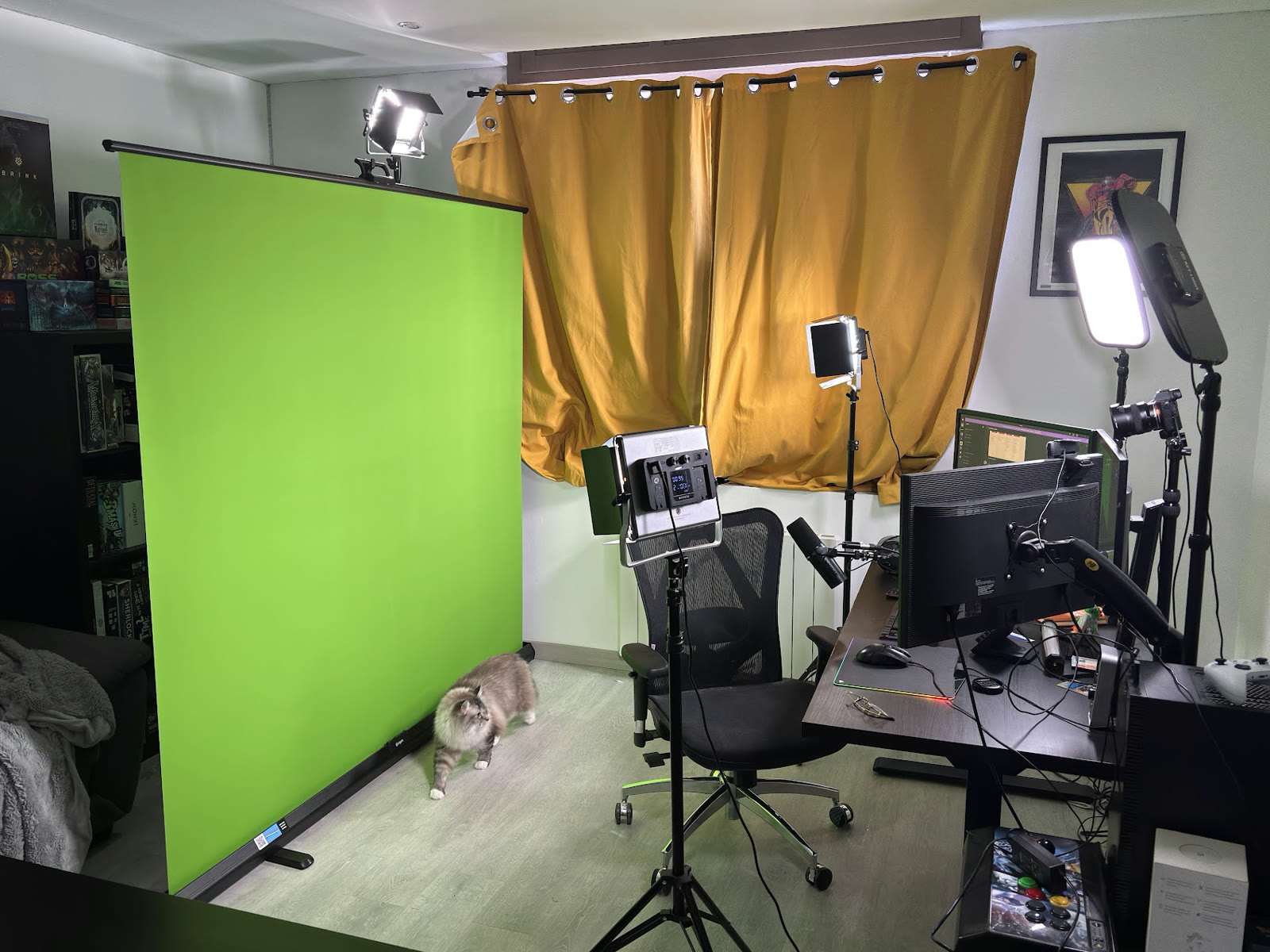
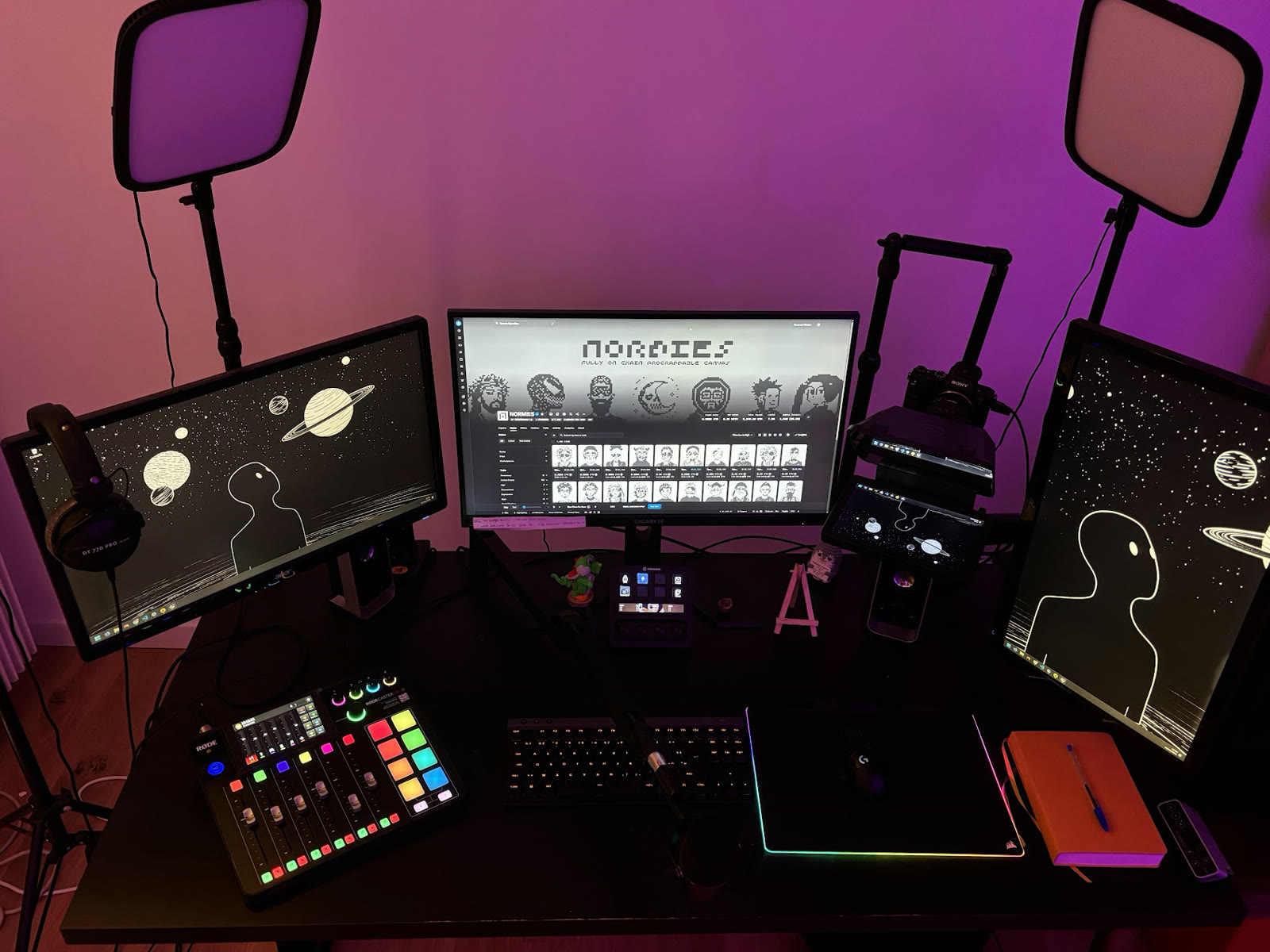
When I feel the need to use the video format for a specific goal, nobody has to rent a set, brief a contractor or explain what we want. I film, I edit, I broadcast live, and the AI studio saves me time on the repetitive part so I can spend it on what matters: the message, the framing, the direction, the faces and voices in the videos!
The studio is a kind of production assistant!
Video: from transcription to DaVinci Resolve
This is where the gain is clearest for me. A video that used to take me 1 hour to produce now takes less than 10 minutes, about 80% of time saved, with quality control included.
In practice: I record (a live, a call, a face-cam video), and the transcription runs by itself on my PC’s graphics card (never on the processor, far too slow). The studio spots the highlights, I make the final selection, and it cuts them into subtitled vertical clips. I can of course make manual touch-ups, drag on the timeline, change the framing...
And since I don’t want to cut myself off from the tools I use - because AI does things well but if I can go faster on a task myself...I might as well do it myself - the studio can export the video project to DaVinci Resolve: I can finish an edit there if the result calls for it. The studio doesn’t lock me in, it does the heavy lifting and I keep control in every case.
And I haven’t even mentioned the rough-cut sorting, what a pleasure not to do it by hand anymore!
And you, how many hours do your video teams lose redoing the same thing on every workstation?
Motion design, driven by voice
I’m not a motion designer and I don’t pretend that AI will replace them. Here again, it’s about increasing production capacity!
For this tool, I dictate a brief (the hook, the screens to show, the call to action, etc.)
The studio produces a board (a storyboard in still images), and I correct scene by scene before launching any render (savings and efficiency oblige): changing an image costs far less than redoing an animation. Then the film is computed, with music and sounds, and synced to my voice-over if I’ve recorded one.
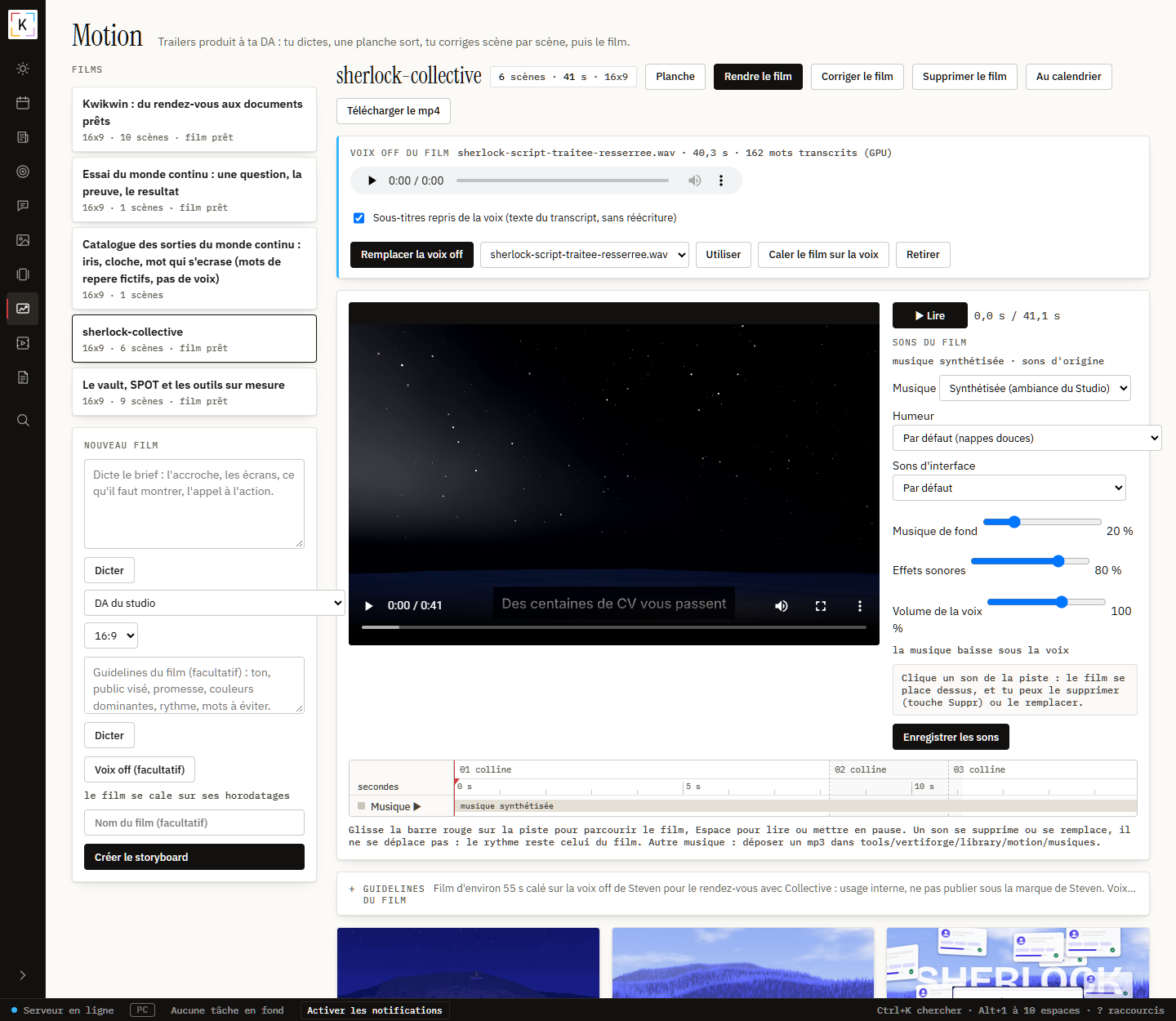
For example, this 53-second video that explains how my vault, SPOT and my custom tools work. I made it entirely with my motion design tool, from the board to the scenes, with my art direction, my real screenshots and its music. No editing software, no template library: a dictated brief, scene-by-scene corrections, one render.
The proof: a film for Sherlock, in one hour
To show what this looks like at a company, I picked a real case: Sherlock, the AI recruiting agent from Collective. I made this video of my own free will, to show what I can produce as a first storyboard step, before rolling out a polish process with artists or other video processes.
I started from what I liked in their previous videos, especially the Watson launch one: a single set, a blue hill, a light but serious tone, a frosted end screen with the logo. Then I dictated to the studio what I wanted to see on screen: a mountain of résumés piling up, a big “Overwhelmed?” behind it, a pause, then the mountain turning into a hill, and Sherlock going off to investigate in the recruiter’s place.
The voice-over is mine. I recorded it, the studio transcribed it and the video synced to it. Result: 41 seconds, six scenes, made in about an hour, with deliberate constraints: only free assets, a local 3D engine developed for the occasion with Claude Code (so reusable), economical in tokens.
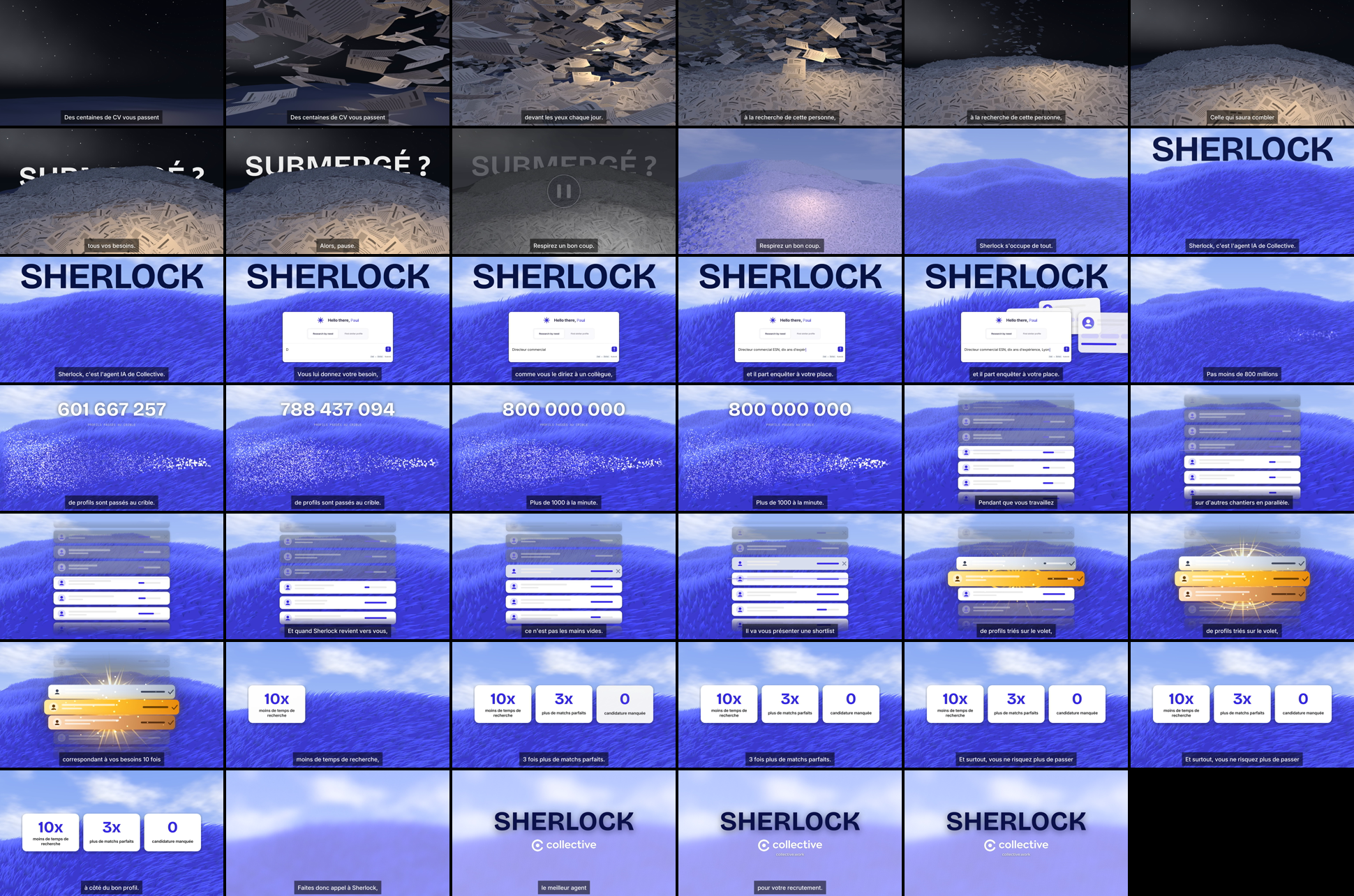
Is it publishable as is? No, and I told Collective so. With half a day more and real assets (a library like Artlist, for example), it can be pushed to a presentable level, adapted to several formats, and cost-effective. A cheaper video to produce means budget freed up for bigger things: live streaming, regular formats, an influencer campaign.
The first versions were bad
I’m not going to tell you everything came out right the first time. My feedback on the first version was, word for word: “The opening screen is unacceptable, those 3D models look so cheap. And it’s so empty.” On the second: “The stamps look pretty sloppy.” I had to redo the opening three times, and the session lasted about 150 turns.
What I took from it matters more than the video itself, actually, and once again it’s the strength of my vault: every mistake became an automatic check. Brand names written in lowercase are rejected. An off-center element is rejected. A contact sheet (one frame per second) is generated before I look at the film. And the studio refuses to render if its code is newer than the running server. Those flaws won’t come back!
A studio designed to be plugged into your business
Everything above is built so I can use it for my clients...otherwise, what’s the point?
The motion engine is described in a single configuration file: changing brand means changing one file (colors, fonts, logos, texts), without touching anything else. For Collective, I have a Collective brand. For me, a neutral brand in my art direction. For another company, we copy the neutral brand and fill it in.
Same logic for the rest: my tools adapt to your context rather than the other way around. If you work with a CRM, everything will run on it.
If you already have a project tracking tool, we plug into it.
Your teams already have their habits and are already busy: asking them to learn one more tool is the best way to make sure nobody uses it.
You don’t want me to store certain information? No worries, I won’t.
You don’t want any of this in your company? No problem, these are my work tools, I’m not imposing them on you.
A studio that, like the vault, keeps improving
A fixed bug becomes a test. More than 1,400 automatic checks run without AI and cost no tokens. When I find a defect, it becomes a check case before it’s closed: it doesn’t come back, as I said earlier.
Every task goes through “the cheapest level that does it well”. What is deterministic is a script (zero tokens). What doesn’t require judgment goes through a free local model. A mid-range model writes the code and the texts. I only pay for the most expensive model to decide, for example on the architecture of a new system I’m going to design with it.
Handover notes between sessions. Beyond roughly 150 turns, a conversation with an AI costs more than it brings, because it rereads its entire history at every exchange. That’s actually how you burn all your tokens. I talked about it on LinkedIn here:
One brain, several interfaces: SPOT, Telegram, my PC, my Mac...
The vault is the memory. The studio is the workshop. What’s left is talking to it without opening the computer when I need to...
That’s the role of SPOT, the little pocket voice assistant I built with €35 of hardware: I dictate an idea while walking and it lands in the vault, or I ask it for a document that arrives on my phone through Telegram. It lives on a development board, and the memory behind it is the same as on my computer: it’s both a great wow effect when I show it and a gadget that’s actually useful!
Telegram is my channel when I’m away from my desk: the morning news roundup, prospecting reminders, the documents SPOT sends me. And my PC runs everything heavy in the background: transcriptions, video renders, 3D films. One brain, several ways to talk to it depending on the moment and what I have at hand!
SPOT is built to order: your colors, your content, your processes. Imagine giving one to every new hire for their onboarding, with all of your company’s knowledge inside, instead of yet another mug. If the idea speaks to you, contact me and we’ll see together what it could look like at your company!
What it brings
Let’s talk about what interests everyone here: the R O I! What do I get out of everything I’ve done?
- Time. A video that used to take 1 hour now takes less than 10 minutes, about 80% saved on production, quality control included.
- Consistency. One piece of content a day, kept up without giving up my evenings. The calendar tells me what to publish, the news monitoring gives me the material, the editing does the heavy lifting, and I steer and rewrite everything afterwards.
- Reliability. The automatic checks run without AI, and a bug doesn’t come back.
- Controlled cost. Repetitive tasks go through scripts or a free model. My real AI subscription cost: $180 a year, a single Claude Pro subscription, because I’ve set up safeguards and token optimization.
- Commercial proof. I’m not promising you a tool: I’m showing you the one running behind the scenes.
And the whole thing remains fully under my control. Nothing goes out without my review, and everything stays aligned with my business goals, or yours when the studio works for you.
Want us to work together on your marketing, product, sales and AI topics?
I’m a CMO and content creator, specialized in tech and AI, and I only use AI when it serves the business. If you’re looking for someone who designs the strategy, builds the tools that serve it and can prove it on real films, content and processes, we can talk.
I’m on LinkedIn, or by email if you prefer.
I’m a CMO and I only use AI when it serves the business. Assignment or job: write to me.